
Never Type Another Receipt Again
Picture this: you're savoring an incredible meal at a Parisian bistro, your plate cleared, and the waiter brings the check. In the old days, you'd fumble with your phone, squinting at the foreign currency, painstakingly typing every detail into a spreadsheet. But those days are over.
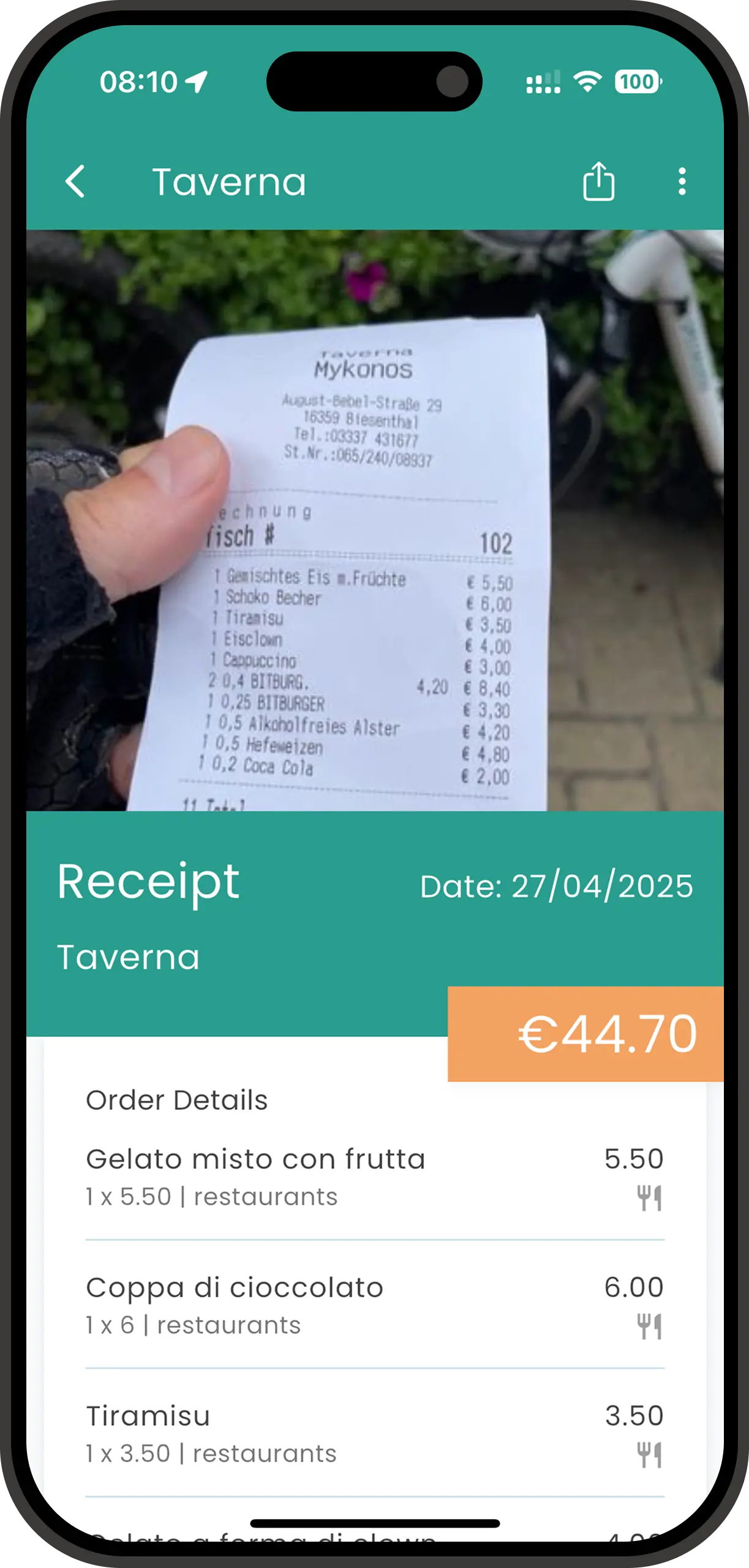
With Spentrip's intelligent receipt scanning, all you need to do is snap a quick photo. In seconds, our advanced AI extracts the amount, date, merchant name, and currency automatically — no manual entry required. Whether you're tracking a coffee in Tokyo, a taxi in Mumbai, or a hotel in Barcelona, one photo captures it all.
This feature is designed for travelers who want to stay present in the moment while keeping perfect expense records. No more interrupting your adventures to type receipts. No more missing transactions because you forgot to log them. Just point, shoot, and move on with your journey.
How Receipt Scanning Works
Spentrip's receipt scanning technology combines optical character recognition (OCR) with machine learning to deliver fast, accurate results. Here's the simple four-step process that happens automatically:
Capture the Photo
Open Spentrip and tap the camera icon. Position your receipt in the frame and snap a photo. The app works with any lighting and handles various receipt sizes automatically.
AI Analyzes the Receipt
Our machine learning model processes the image, identifying text patterns and extracting structured data. The AI recognizes merchant names, total amounts, dates, currencies, and even line items.
Instant Expense Creation
Within 2-3 seconds, Spentrip creates a complete expense entry with all details populated. The receipt image is attached for your records, and the amount is added to your trip budget automatically.
Review & Confirm
Quickly review the extracted details. In most cases, everything is perfect. If you need to make adjustments, just tap any field to edit. The original receipt image is always saved for reference.
The entire process takes just seconds. What used to require 5-10 minutes of manual data entry now happens automatically, freeing you to focus on enjoying your travels instead of managing spreadsheets.
The Benefits of Automated Receipt Scanning
Save 5+ Minutes Per Receipt
Manual entry is time-consuming and tedious. Scanning a receipt takes 10 seconds versus 5-10 minutes of typing. On a two-week trip with 50 receipts, that's over 4 hours saved — time you could spend exploring instead.
95%+ Accuracy Rate
Spentrip's AI delivers exceptional accuracy, correctly identifying amounts, dates, and merchant names in over 95% of scans. This eliminates typos and data entry errors that plague manual tracking methods.
Works Anywhere in the World
Travel to any country and scan receipts in any language. The AI handles foreign currencies, different date formats, and multilingual text seamlessly. Perfect for international adventures and global business travel.
Offline Photo Capture
No internet? No problem. Take photos of receipts anytime, anywhere. Images are stored locally and processed automatically when you reconnect. Never miss an expense due to spotty WiFi again.
Real-World Scenarios
Business Traveler: Expense Report Ready
Sarah travels monthly for client meetings across Europe. Instead of saving paper receipts and typing them into her company's expense system later, she scans every receipt immediately with Spentrip. At the end of her trip, she exports a complete, itemized report with all receipt images attached. Her finance team loves the accuracy and detail, and Sarah saves hours of administrative work. Traveling alone for your own business instead? Here's how to pick a business travel expense app when you're also the finance department.
Backpacker: Track Every Penny on the Road
Miguel is backpacking through Southeast Asia on a tight budget. Every expense matters, from street food to hostel stays. He uses receipt scanning to capture every purchase, even handwritten receipts from market vendors. The AI handles Thai, Vietnamese, and Indonesian receipts with ease. Miguel always knows exactly where his money is going and stays within budget.
Family Vacation: Shared Expense Tracking
The Johnson family is traveling through Italy with grandparents, parents, and three kids. Different family members pay for various expenses throughout the day. Everyone scans their receipts into the shared trip, creating a complete picture of spending. At the end of the vacation, they can see exactly what the trip cost and how much each category (dining, museums, transportation) added up to.
Frequently Asked Questions
What languages does the receipt scanner support?
Our AI-powered scanner can read receipts in virtually any language, including English, Spanish, French, German, Italian, Chinese, Japanese, Arabic, and many more. The system automatically detects the language and extracts the relevant information.
How accurate is the receipt scanning?
Spentrip's receipt scanner achieves over 95% accuracy on clear receipt images. The AI recognizes amounts, dates, merchant names, and currencies with high precision. You can always review and edit any details if needed.
Can I scan receipts offline?
Yes! You can take photos of receipts anytime, even without internet connection. The images are stored locally and processed automatically when you're back online.
What if my receipt is crumpled or faded?
Our AI is trained to handle imperfect receipts. While clear images work best, the scanner can often extract information from crumpled, faded, or partially damaged receipts. Just ensure the key details (amount, date, merchant) are visible.
Join our growing community of travelers who enjoy their adventures without expense tracking headaches
Start your journey to stress-free travel expense tracking today