
Log It Before You Forget It
You buy a coffee at a street cart in Lisbon. It's three euros, paid in cash, and there's no receipt. You tell yourself you'll log it later. You won't.
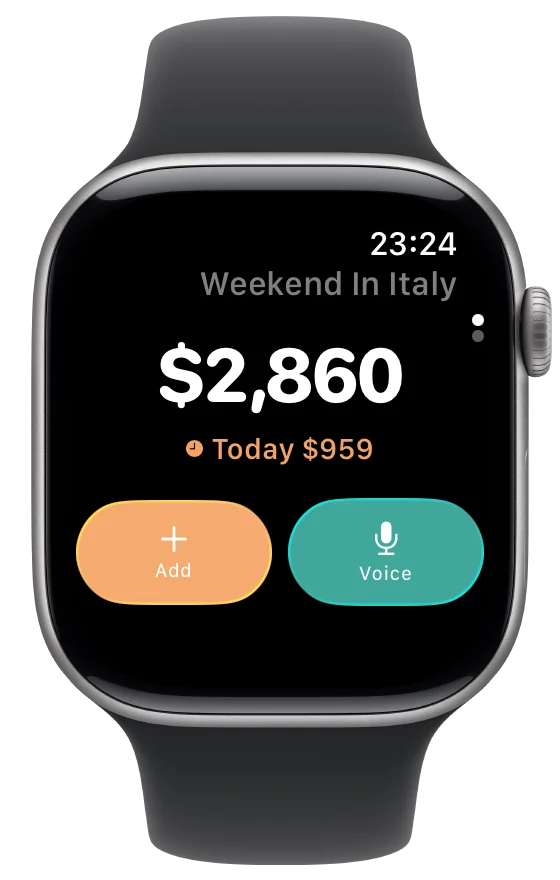
Spentrip's Apple Watch app closes that gap. Raise your wrist, tap Add or Voice, and the expense is recorded in seconds. It syncs to your phone automatically — no extra steps, no forgotten purchases.
Whether you're navigating a busy market, riding public transit, or hiking a trail, the Watch app keeps your expense tracking going without slowing you down.
Two Ways to Log
The Watch app gives you two fast entry methods. Both take a few seconds and work without your phone nearby.
Voice
Tap Voice, say "fifteen euros for lunch," and Spentrip creates the expense with the amount, merchant, and category filled in. Done in under five seconds.
Manual
Tap Add, enter the amount with the digital crown, pick a category from your recents, and save. Quick and precise when you prefer tapping over talking.
What's on the Watch
Spending at a Glance
See your trip total and today's spending the moment you open the app. No scrolling, no tapping — the numbers you care about are right there.
Automatic Sync
Expenses logged on the Watch sync to your iPhone through iCloud. Open Spentrip on your phone and everything is already there — no manual transfer needed.
When the Watch App Shines
Cash Purchases
No receipt, no paper trail. Street food vendors, market stalls, taxis that only take cash — these are the expenses that slip through the cracks. A quick voice entry on your Watch captures them before they're forgotten.
On the Move
Walking between sights, riding the metro, waiting in line — moments when pulling out your phone feels like too much effort. Raise your wrist, say the expense, and keep moving.
Quick Budget Checks
Wondering if you've overspent today? Glance at your Watch to see the trip total and daily spending. No need to unlock your phone or open the app — the information is always one wrist raise away.
Frequently Asked Questions
Do I need the iPhone app open for the Watch to work?
No. The Watch app works independently once your account is set up. Expenses sync to iCloud and appear on your iPhone the next time it connects, even if the app wasn't open.
Can I scan receipts from the Watch?
No. The Watch app is designed for quick manual and voice entries. For receipt scanning, use the iPhone app or forward receipts by email.
Which Apple Watch models are supported?
Spentrip supports Apple Watch Series 4 and later running watchOS 10 or newer.
Which trip do Watch expenses go to?
Expenses logged on the Watch are added to whichever trip is currently selected on your iPhone. To change the trip, open Spentrip on your phone and switch there.
Join our growing community of travelers who enjoy their adventures without expense tracking headaches
Start your journey to stress-free travel expense tracking today