
Spentrip Now Runs on Apple Watch — with Siri Shortcuts
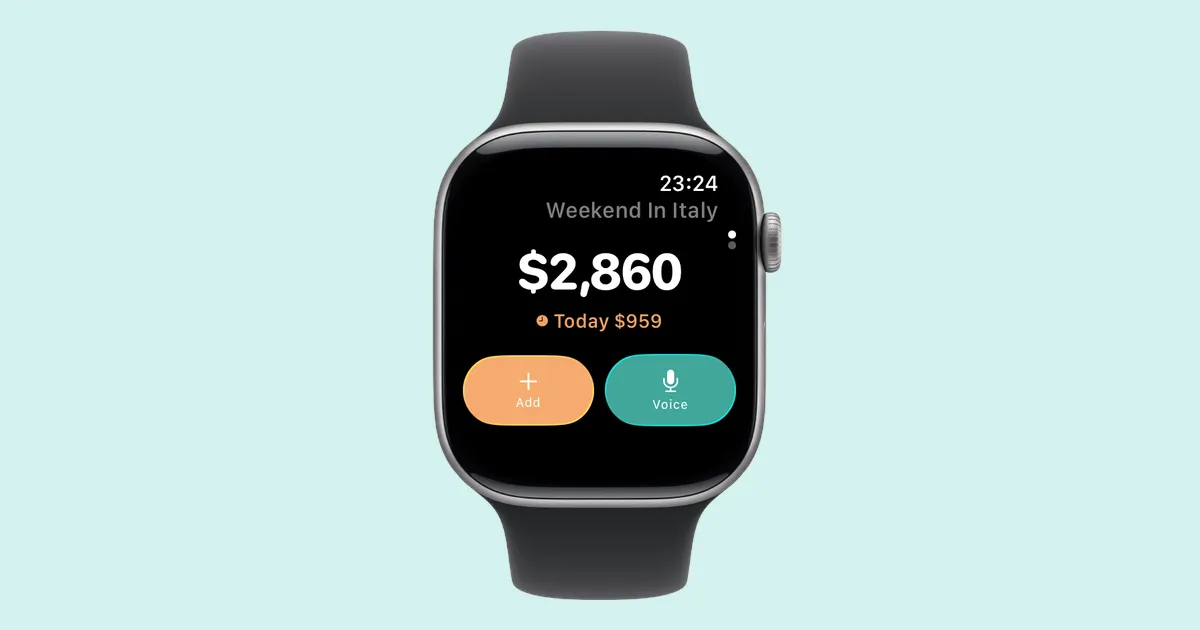
Spentrip v1.13 adds an Apple Watch companion app and Siri shortcuts for logging expenses hands-free. If you’ve ever skipped tracking a purchase because your phone was buried in a bag, this update is the fix.
The Problem with Phones at Markets
There’s a specific moment when expense tracking falls apart: you’re standing in a street market in Marrakech, you just bought saffron for 80 dirhams, your hands are full, and your phone is zipped inside your daypack. You tell yourself you’ll log it later. You won’t. Multiply that by every cab, coffee, and snack across a two-week trip, and you’re left with a budget that’s more fiction than record.
The watch app exists to close that gap. Raise your wrist, tap, done — while the vendor is still making change.
What’s on the Watch
The app shows your current trip front and center: total spent, today’s spending, and two buttons for adding expenses.
Add opens a quick entry screen. Pick a category (the picker remembers your recent choices, so if you’ve been eating your way through a city, Food is right there), enter the amount, and it’s saved. The whole interaction takes about five seconds.
Voice lets you dictate something like “14 euros for lunch” or “cab to the airport 350 baht.” The text gets sent to the server, which parses out the amount, currency, and category. It handles the ambiguity well — you don’t need to speak in any particular format.
Beyond the main screen, you get:
- A budget ring that fills as you spend, so you can see at a glance whether you’re on track or burning through your daily limit
- A recent expenses list for reviewing or deleting mistakes
- Watch face complications showing your budget status, today’s total, or trip spending — no need to open the app at all
Everything works offline. If your phone isn’t nearby, expenses queue up on the watch and sync automatically when the phone comes back in range. Nothing gets lost.
How the Sync Works
The watch never talks to the server directly. It sends data to your phone over Bluetooth, and the phone handles the rest. This keeps things reliable — if you’re on a flight or out of cell range, expenses sit on the watch until your phone is reachable, then sync silently. You don’t need to think about it.
When you add an expense on the watch, the spending totals update immediately on your wrist before the server round-trip completes. No waiting, no spinners.
Siri Shortcuts
Say “Log expense in Spentrip” from your phone or watch, and Siri opens a quick entry flow. It works in 11 languages, matching whatever your device is set to — so if your iPhone is in French, “Enregistrer une dépense dans Spentrip” works too. You can also add it to custom Shortcuts automations if you want to trigger it differently.
Also in This Update
We fixed a race condition in receipt image uploads that could cause scans to get stuck in a “processing” state. If you’ve seen receipts hang after scanning, that should be resolved now.
Requirements and Availability
The watch app requires an iPhone with Spentrip installed and an Apple Watch running watchOS 26. It’s included in the app — no separate download needed.
Expense logging from the watch works on both the free and premium tiers. Voice parsing (the “14 euros for lunch” dictation feature) and AI receipt scanning remain premium features.
Download Spentrip or update to v1.13 from the App Store.